
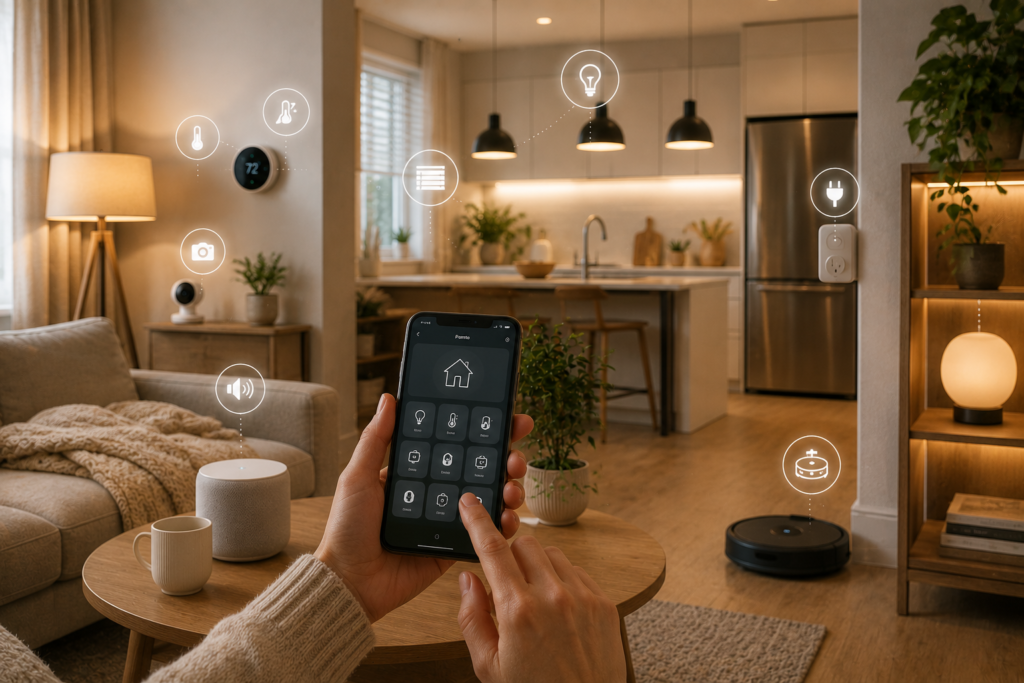
Smart-home technology isn’t just about having futuristic gadgets around your house.
The real benefit is much simpler: letting technology handle repetitive tasks so you don’t have to.
Turning lights on every evening, checking whether the front door is locked, adjusting the temperature, turning appliances off, and preparing your home for bedtime are all small tasks.
But when they happen every day, automating them can make a noticeable difference.
The best part is that you don’t need a fully automated house to get started.
With a few carefully chosen smart devices, you can create simple routines that make your home more convenient, comfortable, and efficient.
In this guide, we’re looking at 10 everyday tasks you can automate with smart home devices, including how each automation works, what devices you need, and how to set it up.
What Is Smart Home Automation?
Smart-home automation means setting connected devices to perform actions automatically based on a trigger.
A trigger could be:
- A specific time
- A voice command
- Motion detection
- A door opening
- Your arrival home
- Your departure
- Another device changing state
For example:
Trigger: 7:00 PM
Action: Turn on the living room lights.
Or:
Trigger: Front door opens
Action: Turn on the entryway light.
The idea is simple:
When X happens → do Y automatically.
1. Turn Your Lights On Automatically
Lighting is one of the easiest smart-home tasks to automate.
Instead of manually switching on your lights every evening, you can schedule them to turn on at a particular time or trigger them based on another event.
What you need:
- Smart bulbs or smart switches
- Compatible smart-home platform
Example automation:
At 6:30 PM → Turn on living room lights.
You can also create different schedules for weekdays and weekends.
How to set it up:
Step 1: Install compatible smart bulbs.
Step 2: Connect them to your smart-home platform.
Step 3: Group your lights by room.
Step 4: Create a schedule.
Step 5: Choose the brightness level if supported.
Step 6: Test the routine.
Why it’s useful
It makes your home feel welcoming when you arrive and eliminates one small daily task.
2. Create an Automatic Morning Routine
Your morning routine is another great candidate for automation.
Instead of manually performing several tasks, you can create a routine that starts your day with a single trigger.
Depending on your devices, your morning routine could:
- Turn on bedroom lights
- Turn on kitchen lights
- Provide weather information
- Read reminders
- Play music
- Adjust compatible devices
Example:
Trigger: 7:00 AM
Actions:
- Bedroom lights turn on gradually.
- Kitchen light turns on.
- Smart speaker provides your morning information.
- Selected music starts playing.
How to create it:
Step 1: Write down your normal morning routine.
Step 2: Identify which tasks can be automated.
Step 3: Connect compatible devices.
Step 4: Create a morning routine.
Step 5: Test it for several days.
Keep the first version simple.
You can always add more actions later.
3. Turn Off Devices at Bedtime
Bedtime is another excellent opportunity for automation.
Instead of walking around your home switching everything off, you can create a Good Night routine.
Your routine could:
- Turn off selected lights
- Turn off compatible smart plugs
- Lock a compatible smart lock
- Adjust compatible thermostats
- Turn on a hallway light
Example:
Voice command: “Good night.”
Actions:
Living room lights → OFF
Kitchen lights → OFF
Bedroom light → 30%
Compatible door lock → LOCK
How to set it up:
Step 1: Identify what you normally switch off before bed.
Step 2: Connect compatible devices.
Step 3: Create a Good Night routine.
Step 4: Add the actions.
Step 5: Test each action separately.
A bedtime routine can be one of the most satisfying automations because it removes several repetitive steps at once.
4. Turn Lights On When You Enter a Room
Motion sensors can make your home feel more responsive.
For example, you could have a hallway light turn on when movement is detected.
What you need:
- Compatible motion sensor
- Smart bulb or smart switch
Example:
Motion detected → Turn on hallway light.
You can also set the light to turn off automatically after a certain period if your system supports it.
Best locations:
- Hallways
- Entryways
- Bathrooms
- Closets
- Laundry areas
Setup steps:
Step 1: Install the motion sensor.
Step 2: Connect it to your smart-home platform.
Step 3: Add your smart light.
Step 4: Create the automation.
Step 5: Choose how long the light should remain on.
Step 6: Test it at different times.
Motion automation is particularly useful in areas where you don’t want to search for a light switch.
5. Automate Your “Leaving Home” Routine
Leaving the house often involves the same checklist:
- Turn off lights
- Turn off selected appliances
- Lock doors
- Adjust the thermostat
- Activate compatible security devices
A smart-home system can combine some of these actions into one routine.
Example:
Trigger: You activate your Away routine.
Actions:
- Selected lights → OFF
- Compatible smart plugs → OFF
- Smart lock → LOCK
- Thermostat → Away setting
- Security devices → Appropriate mode
How to create it:
Step 1: Make a list of what you normally do before leaving.
Step 2: Identify which actions can safely be automated.
Step 3: Create an Away routine.
Step 4: Test it while you’re still home.
Step 5: Make adjustments.
Don’t automate anything that could create a safety issue if it operates without supervision.
6. Make Your Home Look Occupied While You’re Away
If you’re traveling, smart lighting can help you avoid having your home look completely inactive.
You can create schedules that turn selected lights on and off at different times.
Example:
6:45 PM → Living room light ON
9:30 PM → Living room light OFF
8:00 PM → Bedroom light ON
10:30 PM → Bedroom light OFF
The exact schedule doesn’t need to be complicated.
How to set it up:
Step 1: Choose a few visible lights.
Step 2: Create varied schedules.
Step 3: Avoid making every light follow exactly the same pattern.
Step 4: Test the schedule before traveling.
This is best treated as one layer of home security—not a replacement for appropriate security measures.
7. Automate Your Coffee or Morning Appliances
Some everyday appliances can be integrated into routines using compatible smart plugs or their own smart features.
For example, a compatible coffee setup might be scheduled to begin preparation around your usual morning time.
Important safety consideration
Not every appliance is suitable for unattended operation.
Before using a smart plug with an appliance, check:
- The manufacturer’s instructions
- The appliance’s operating requirements
- The smart plug’s electrical rating
- Whether the appliance safely resumes operation when power is restored
Never automate an appliance if doing so could create a fire, overheating, or other safety risk.
Safer alternatives
You can use smart automation for a lamp or another suitable low-risk device instead.
8. Automate Energy-Saving Habits
Smart devices can help you turn energy-saving habits into routines.
For example, you could schedule selected lights to turn off automatically.
You could also use compatible smart plugs to manage certain devices.
Example:
11:00 PM → Decorative lights OFF
12:00 AM → Selected compatible devices OFF
Another option
Use energy-monitoring smart plugs to understand how much electricity certain connected appliances consume.
This can help you identify unnecessary usage.
How to get started:
Step 1: Identify devices that are frequently left on.
Step 2: Determine whether automation is appropriate.
Step 3: Add compatible smart plugs or controls.
Step 4: Create schedules.
Step 5: Monitor your results.
The goal is not simply to add more smart devices.
It’s to make good habits easier.
9. Automate Your Home Security Routine
Smart security devices can work together to provide a more convenient security routine.
Depending on your products, an automation could involve:
- Door sensors
- Smart cameras
- Motion sensors
- Smart locks
- Smart lighting
- Video doorbells
Example:
Trigger: Away mode activated.
Actions:
- Selected doors lock
- Security devices activate their appropriate settings
- Selected lights follow an away schedule
- Notifications remain enabled
Another example:
Trigger: Motion detected at the entrance.
Action: Turn on the compatible outdoor light.
Important
Security automations should always be tested carefully.
You should understand what happens if:
- Wi-Fi goes offline
- A device loses power
- A battery becomes low
- A sensor fails
- An automation doesn’t run
Smart automation should support your security habits—not replace them.
10. Create a “Welcome Home” Routine
One of the most enjoyable automations is creating a routine that makes your home feel welcoming when you arrive.
Depending on your setup, it could:
- Turn on entryway lights
- Turn on living room lights
- Adjust compatible climate controls
- Start music
- Disable selected away settings
Example:
Trigger: You arrive home or activate a home routine.
Actions:
Entry light → ON
Living room light → ON
Selected thermostat setting → Home
Smart speaker → Welcome routine
How to create it:
Step 1: Choose the devices you want to activate.
Step 2: Choose a reliable trigger.
Step 3: Create the routine.
Step 4: Test it when arriving home.
Step 5: Adjust the timing.
Keep it subtle.
The best welcome routine should make your home feel comfortable—not like you’re entering a futuristic control center.
10 Smart Home Automations at a Glance
| Automation | Devices You May Need | Difficulty |
|---|---|---|
| Automatic lighting | Smart bulbs | Easy |
| Morning routine | Speaker + smart devices | Easy |
| Good Night routine | Smart lights/plugs | Easy |
| Motion lighting | Motion sensor + light | Easy |
| Away routine | Smart devices | Moderate |
| Vacation lighting | Smart bulbs | Easy |
| Appliance automation | Compatible smart plug | Moderate |
| Energy scheduling | Smart plugs/lights | Easy |
| Security routine | Sensors + compatible devices | Moderate |
| Welcome Home | Lights + compatible devices | Moderate |
How to Build Smart Home Automations Step by Step
If you’re new to automation, follow this simple process.
Step 1: Identify a Repetitive Task
Choose something you do every day.
For example:
Turning off lights before bed.
Step 2: Choose the Right Device
You might need:
Smart bulb + smart-home platform
Step 3: Connect the Device
Follow the manufacturer’s setup instructions.
Step 4: Create a Trigger
Your trigger could be:
- Time
- Motion
- Voice command
- Arrival
- Departure
Step 5: Add the Action
Tell the system what should happen.
Example:
10:30 PM → Turn off living room lights.
Step 6: Test It
Don’t assume it will work perfectly the first time.
Test the automation.
Step 7: Fine-Tune It
If the light turns off too early, change the schedule.
If motion detection triggers too often, adjust the sensor.
Automation should adapt to your lifestyle.
The Best Smart Home Automation Strategy
The most useful automations usually share three characteristics.
They’re repetitive.
If you perform a task once a month, automating it may not be worthwhile.
They’re predictable.
Tasks that happen at a consistent time or under predictable conditions are easier to automate.
They save effort.
The best automation is one that makes your life noticeably easier.
Before creating a routine, ask:
“Will this actually make my day easier?”
If the answer is yes, it’s probably worth trying.
Smart Home Automation for Beginners: Start Small
If you’re new to smart-home technology, don’t try to automate all ten tasks immediately.
Start with these three:
1. Automatic Lighting
Easy to set up and immediately useful.
2. Good Night Routine
Combines several small tasks into one.
3. Morning Routine
Helps you start the day with less effort.
Once those work reliably, add more.
How to Avoid Over-Automating Your Home
Automation should simplify your life.
Too much automation can have the opposite effect.
For example, if your lights keep turning off because a sensor doesn’t detect movement correctly, the technology becomes frustrating.
Follow these rules:
- Keep routines simple.
- Avoid unnecessary triggers.
- Test every automation.
- Use manual controls when appropriate.
- Don’t automate safety-critical functions without understanding the risks.
- Review routines periodically.
Your home should remain easy to control even when automation isn’t available.
Smart Home Automation Shopping Checklist
Before buying a device for automation, consider:
| Feature | Why It Matters |
| Compatibility | Ensures devices can work together |
| Automation support | Allows routines |
| App quality | Makes setup easier |
| Voice control | Adds convenience |
| Hub requirement | May affect total cost |
| Subscription | Can create ongoing expenses |
| Offline behavior | Important during connectivity issues |
| Security updates | Helps protect connected devices |
| Privacy | Important for cameras and sensors |
| Warranty | Adds long-term value |
Common Smart Home Automation Mistakes
Automating Everything
More automation doesn’t necessarily mean a better home.
Better: Automate repetitive tasks that genuinely save time.
Using Too Many Different Platforms
A collection of unrelated devices can become difficult to manage.
Better: Choose compatible products whenever possible.
Forgetting Manual Controls
Technology can fail.
Better: Make sure important devices can still be controlled manually when appropriate.
Creating Complicated Routines
Complex routines are harder to troubleshoot.
Better: Start with one trigger and a few actions.
Ignoring Privacy
Connected devices can collect information about your home and habits.
Better: Review privacy settings and account security.
Frequently Asked Questions
What is the easiest smart-home automation?
Automatic lighting is one of the easiest places to start. A compatible smart bulb can be scheduled to turn on or off at specific times.
What should I automate first?
Start with a repetitive task you perform every day, such as controlling lights, creating a bedtime routine, or turning selected devices off.
Do I need a smart speaker for automation?
No. Many automations can be created through smartphone apps or smart-home platforms. A smart speaker is mainly useful for voice control and compatible routines.
Can I automate my existing appliances?
Sometimes. Compatible smart plugs can provide basic automation for certain appliances, but you should always check the appliance manufacturer’s instructions and the smart plug’s electrical rating first.
Can smart-home automation save electricity?
It can help you manage usage by scheduling lights and compatible devices, but actual savings depend on your equipment, habits, and electricity rates.
Is smart-home automation difficult?
Basic automation is often quite simple. Smart bulbs, smart plugs, and basic routines are good starting points for beginners.
Can smart-home automations work without internet?
This varies by device and platform. Some automations may continue locally, while others depend on cloud services or an internet connection.
How many automations should I have?
There is no ideal number. Start with a few useful routines and add more only when they solve a genuine problem.
Final Verdict
Smart-home automation doesn’t need to be complicated.
The best place to start is with the small tasks you repeat every day.
Turn the lights on automatically. Create a Good Night routine. Build a morning routine. Use motion sensors in areas where automatic lighting makes sense. Schedule selected devices to turn off when they’re no longer needed.
Then, as you become more comfortable, you can connect security devices, sensors, smart locks, and other compatible products.
The goal isn’t to automate everything.
It’s to automate the right things.
Start with one task, choose a device that solves it, test the automation, and build from there.
A smarter home isn’t necessarily the home with the most technology.
It’s the home that makes everyday life easier.