
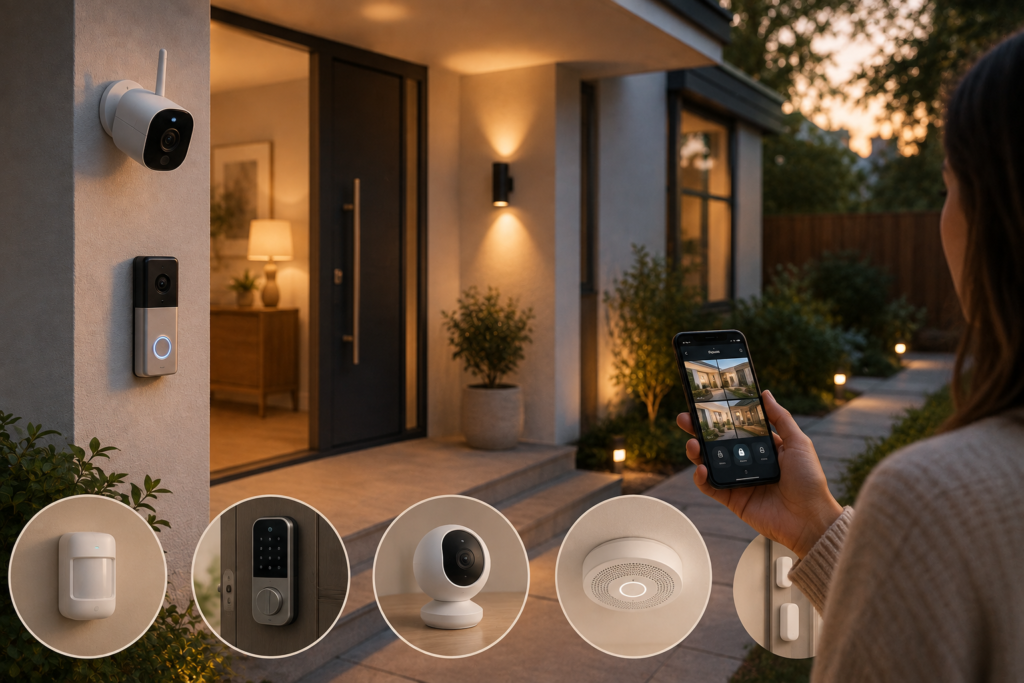
Home security has changed dramatically in recent years.
You no longer need an expensive, professionally installed security system to add useful protection to your home. Today, smart security devices can help you monitor entrances, receive alerts, check activity remotely, and make your home more aware of what’s happening around it.
The key is choosing the right devices for your home and your actual security needs.
A smart doorbell may be useful for monitoring your front entrance. A door sensor can alert you when a door opens. A smart camera can provide remote viewing, while motion sensors can help detect unexpected activity.
But smart security isn’t simply about buying more gadgets.
It’s about creating a system where each device has a clear purpose.
In this guide, we’ll explain how to make your home safer with smart security devices, what each device does, where to install it, how to set it up, and what privacy and security features you should consider before buying.
What Are Smart Security Devices?
Smart security devices are connected products designed to help you monitor, control, or protect your home.
Depending on the product, they can:
- Send alerts to your smartphone
- Record video
- Detect motion
- Detect doors or windows opening
- Provide remote access
- Allow two-way communication
- Automate lights
- Control compatible locks
- Integrate with other smart-home devices
Some products work independently, while others can be connected through a larger smart-home ecosystem.
The best setup depends on your home, budget, lifestyle, and comfort level with connected technology.
1. Start With a Smart Video Doorbell
For many homes, the front door is the most logical place to begin.
A smart video doorbell can combine a doorbell, camera, microphone, and motion detection into one device.
Depending on the model, it may allow you to:
- See who is at the door
- Receive motion alerts
- Speak with visitors remotely
- View live video
- Record activity
- Check your entrance while away
Why start here?
Your front entrance is one of the most important areas to monitor because it is where visitors, deliveries, and other activity naturally occur.
How to set it up:
Step 1: Choose a location with a clear view of the entrance.
Step 2: Check whether the device requires wiring, a battery, or another power source.
Step 3: Install it according to the manufacturer’s instructions.
Step 4: Connect it to the required app or network.
Step 5: Adjust motion detection zones.
Step 6: Test notifications and video quality.
Buying tip
Don’t choose a doorbell based only on camera resolution.
Also consider:
- Night vision
- Field of view
- Motion detection
- Two-way audio
- Local versus cloud storage
- Subscription requirements
- Weather resistance
- Privacy features
2. Add Smart Door and Window Sensors
Sometimes the simplest devices can be extremely useful.
Smart contact sensors typically consist of two small pieces that detect whether a door or window is open or closed.
When connected to a compatible system, they may send notifications when activity occurs.
Where to install them:
- Front door
- Back door
- Patio door
- Ground-floor windows
- Garage entrance
You don’t necessarily need a sensor on every window.
Start with the entrances that matter most for your home.
How to install them:
- Clean the mounting surface.
- Attach the two sensor components according to the manufacturer’s instructions.
- Connect the sensor to its app or hub.
- Name it clearly.
- Open and close the door or window to test it.
- Enable appropriate notifications.
For example, naming a sensor “Back Door” is much more useful than leaving it with a generic device name.
3. Use Smart Security Cameras Strategically
Security cameras can provide a broader view of important areas around your home.
But more cameras don’t automatically mean better security.
Instead, think about coverage.
Potential locations:
- Front entrance
- Back entrance
- Garage
- Driveway
- Common outdoor areas
- Important interior areas
Avoid placing cameras in private spaces such as bedrooms or bathrooms.
What to look for:
Video quality: Clear footage makes activity easier to identify.
Night vision: Important for low-light conditions.
Motion detection: Helps reduce unnecessary notifications.
Two-way audio: Useful for communicating through the camera.
Storage: Check whether footage is stored locally, in the cloud, or both.
Privacy controls: Look for features such as activity zones and camera privacy modes.
4. Install Motion Sensors
Motion sensors can add another layer of awareness without requiring a camera.
They detect movement in a defined area and can trigger notifications or compatible automations.
Good locations include:
- Entryways
- Hallways
- Garages
- Living areas
- Storage rooms
Motion sensors can also be connected to lighting.
For example, a hallway light could turn on automatically when movement is detected.
How to use them effectively:
Step 1: Identify an area where unexpected movement matters.
Step 2: Position the sensor according to its detection range.
Step 3: Connect it to your smart-home system.
Step 4: Test the detection area.
Step 5: Adjust sensitivity if the product allows it.
Avoid placing sensors where normal household movement will constantly trigger unnecessary alerts.
5. Consider a Smart Lock
Smart locks can provide convenient alternatives to traditional keys.
Depending on the model, you may be able to:
- Lock or unlock the door remotely
- Use a keypad
- Create temporary access codes
- Monitor lock activity
- Automatically lock the door
- Give selected people controlled access
Who might benefit?
Smart locks can be particularly useful for:
- Families
- Frequent travelers
- Homeowners with guests
- People who regularly receive deliveries
- Rental properties where permitted
Before buying:
Check whether the lock is compatible with your existing door and whether installation requires replacing the entire lock or only part of it.
Also consider what happens if the battery runs low and whether a physical backup method is available.
6. Connect Smart Lighting to Your Security Setup
Lighting is often overlooked as part of home security.
Smart lighting can allow you to automate lights according to schedules or other compatible triggers.
For example, selected lights could turn on around the time you normally arrive home.
You could also create an “Away” routine that turns selected lights on and off according to a schedule while you’re traveling.
How to create a simple routine:
Step 1: Install compatible smart bulbs or switches.
Step 2: Group the lights by room.
Step 3: Create an away or vacation schedule.
Step 4: Choose different activation times.
Step 5: Test the routine before leaving.
The objective isn’t to make your home look occupied at all times.
It’s simply to avoid having every light follow the exact same predictable pattern.
7. Add a Smart Smoke or Carbon Monoxide Detector
Home security isn’t only about unwanted visitors.
Fire and carbon monoxide are also important household risks.
Depending on local regulations and the product, connected smoke or carbon monoxide detectors can provide alerts through an app in addition to their standard alarms.
Why this can be useful
If you’re away from home, an app notification may provide additional awareness that a traditional alarm alone cannot.
Important:
Smart features should supplement—not replace—properly installed, functioning alarms.
Follow local requirements and the manufacturer’s instructions for installation, testing, maintenance, and replacement.
8. Use Smart Outdoor Lighting
Outdoor lighting can improve visibility around entrances, walkways, garages, and other areas around the home.
Motion-activated lighting can be particularly useful because it illuminates an area when movement is detected.
Good locations:
- Front entrance
- Garage
- Side entrance
- Backyard
- Walkway
- Patio
What to look for:
- Weather resistance
- Motion detection range
- Brightness
- Adjustable sensitivity
- Reliable power source
- Appropriate installation location
Good outdoor lighting should improve visibility without unnecessarily disturbing neighbors or creating excessive glare.
9. Protect Your Smart Home From Digital Threats
Physical security is only part of the equation.
Your smart security devices are connected to accounts, networks, and apps, so digital security matters too.
Follow these basic practices:
Use strong, unique passwords.
Don’t reuse the same password across multiple accounts.
Enable two-factor authentication.
If the manufacturer offers it, turn it on.
Keep devices updated.
Install firmware and app updates when appropriate.
Secure your Wi-Fi network.
Use a strong Wi-Fi password and current security settings supported by your router.
Review account access.
Remove old users and devices you no longer need.
A smart security system should protect your home without creating unnecessary digital vulnerabilities.
10. Protect Your Privacy
Smart cameras and connected devices collect information about your home, so privacy should be part of your buying decision.
Before purchasing a security device, check:
- What data it collects
- Where recordings are stored
- How long recordings are retained
- Whether cloud storage requires a subscription
- Whether you can delete recordings
- Who can access the account
- Whether the manufacturer provides privacy controls
Camera placement matters too.
Avoid pointing cameras toward areas where people reasonably expect privacy.
For indoor cameras, consider models with physical privacy shutters or other mechanisms that clearly disable the camera when needed.
11. Create a Simple “Away From Home” Routine
One of the biggest advantages of connected security devices is automation.
You can potentially create an away routine that:
- Locks compatible doors
- Turns selected lights on or off
- Activates compatible security devices
- Adjusts the thermostat
- Sends notifications
- Checks whether doors are closed
How to build it:
Step 1: List the actions you normally perform before leaving.
Step 2: Identify which actions can be automated.
Step 3: Connect the compatible devices.
Step 4: Create one “Away” routine.
Step 5: Test it while you’re still home.
Keep the routine simple.
A reliable routine is much more useful than a complicated one that frequently fails.
12. Build Your Security System in Layers
You don’t need to buy everything at once.
A practical approach is to build your security system gradually.
Level 1: Basic
- Video doorbell
- Door sensors
- Smart lighting
Level 2: Enhanced
Add:
- Indoor or outdoor camera
- Motion sensors
- Smart lock
Level 3: Advanced
Add:
- Multiple cameras
- Smart smoke/CO detection
- Automated routines
- Additional sensors
- Centralized smart-home control
Start with the areas that matter most and expand only when there is a genuine benefit.
How to Choose the Right Smart Security Devices
Before buying any product, ask these questions:
1. What problem does this device solve?
If you can’t answer this clearly, you probably don’t need it.
2. Where will I install it?
Make sure the device is suitable for the location.
3. Does it need a subscription?
Some products provide basic functionality without a subscription, while others place important features behind a paid plan.
4. Does it work with my existing system?
Compatibility can make a major difference.
5. How is the device powered?
Check whether it uses batteries, mains power, rechargeable batteries, or another method.
6. What happens if the internet goes down?
Understand which security functions continue working locally.
7. How is my data handled?
Review privacy and storage policies before purchasing.
Smart Home Security Shopping Checklist
| Device | Best For | Key Features to Consider |
|---|---|---|
| Smart video doorbell | Front entrance | Video, motion detection, night vision |
| Smart camera | Monitoring | Video quality, storage, privacy |
| Door/window sensor | Entry alerts | Battery life, notifications |
| Motion sensor | Movement detection | Range, sensitivity |
| Smart lock | Keyless access | Access codes, backup entry |
| Smart lighting | Automated lighting | Scheduling, motion triggers |
| Smart smoke detector | Fire alerts | Alarm type, notifications |
| CO detector | Carbon monoxide alerts | Detection, notifications |
| Outdoor security light | Exterior visibility | Motion detection, weather resistance |
Common Smart Security Mistakes to Avoid
Buying Too Many Cameras
More cameras don’t automatically provide better protection.
Better: Identify vulnerable or important areas and focus coverage there.
Ignoring Privacy
A convenient security camera can create privacy concerns if poorly configured.
Better: Review privacy settings and position cameras carefully.
Forgetting About Subscriptions
Some devices require subscriptions for cloud recording or advanced features.
Better: Calculate the long-term cost before purchasing.
Using Weak Account Security
A smart camera with a weak account password can create unnecessary risk.
Better: Use unique passwords and two-factor authentication.
Installing Devices Without Testing Them
A device isn’t useful if alerts don’t reach you.
Better: Test notifications, motion detection, and connectivity after installation.
Relying Entirely on Technology
Smart devices are useful tools, but they shouldn’t replace basic home-security practices.
Better: Combine smart technology with secure doors, appropriate locks, good lighting, and sensible habits.
Frequently Asked Questions
What is the best smart security device to buy first?
For many homes, a smart video doorbell is a practical starting point because it combines entrance monitoring, notifications, and two-way communication in one device.
Are smart security cameras worth it?
They can be useful when placed strategically. Look for cameras that provide the coverage, storage options, privacy controls, and notifications you actually need.
Do smart security devices need Wi-Fi?
Many smart security products use Wi-Fi, although some use other wireless technologies or a dedicated hub. Check the manufacturer’s requirements before purchasing.
Are smart locks safe?
Smart locks can provide convenient access features, but their security depends on the product, installation, account security, and how you use it. Choose reputable products and maintain strong account security.
Can smart lighting improve home security?
Smart lighting can support a broader security strategy through schedules, automation, and motion-triggered illumination. However, lighting should be considered one layer of security rather than a complete solution.
Do smart cameras record all the time?
It depends on the model and settings. Some cameras support continuous recording, while others record only when motion or another event is detected. Check the product’s recording options before buying.
How can I protect my smart security devices from hackers?
Use strong unique passwords, enable two-factor authentication, keep firmware updated, secure your home Wi-Fi network, and regularly review connected devices and account access.
Final Verdict
Making your home safer with smart technology doesn’t mean turning it into a high-tech fortress.
The best approach is to build layers of protection around the areas that matter most.
Start with a smart video doorbell or entry sensors. Add cameras or motion sensors where they provide useful coverage. Consider smart lighting, a smart lock, or connected smoke and carbon monoxide detection as your needs grow.
At the same time, don’t overlook the digital side of security.
Strong passwords, two-factor authentication, software updates, privacy settings, and secure Wi-Fi are just as important as the devices themselves.
Most importantly, choose technology because it solves a real problem—not simply because it has a long list of features.
A smart security system should give you greater awareness, convenience, and peace of mind without making your home unnecessarily complicated.
Start with one area, choose the right device, test it carefully, and build your system gradually.